

MACaQ is a model-agnostic calibrated quantization project for lowering the memory and compute requirements of modern AI models. It supports text, image, video, and audio workflows through llama.cpp, vLLM, Diffusers, and PyTorch.
The project focuses on calibrated low-precision weights and activations while retaining practical inference compatibility. According to the README, MACaQ can quantize a 122-billion-parameter model in 64 minutes using 32.5 GB of device memory. It also reports lower perplexity than MR-GPTQ and DuQuant++ in some comparisons, or comparable Llama-3-8B perplexity with substantially less quantization time.
Choose the right MACaQ backend
Start by selecting the backend that matches your model and deployment target. Use a separate environment for each backend and Python 3.12.
- Diffusers: quantize image, video, and audio generation models to W4A4 safetensors checkpoints.
- llama.cpp: quantize text models to 2-, 3-, or 4-bit GGUF files and run them locally, including on a CPU.
- vLLM: quantize text models for generation or HTTP serving with W4A4 or weight-only formats.
- PyTorch: quantize speech generation models to W4A4 checkpoints and generate WAV audio.
The repository contains backend-specific installation, calibration, quantization, and generation instructions. Open the guide for your chosen backend before starting:
- Diffusers installation and workflows
- llama.cpp installation and workflows
- vLLM installation and serving
- PyTorch speech workflows
Prepare your environment
Use Python 3.12 and create an isolated environment for the backend you plan to use. Keeping environments separate helps avoid dependency conflicts between llama.cpp, vLLM, Diffusers, and PyTorch.
Clone the MACaQ repository and enter its directory.
Create a Python 3.12 virtual environment for the selected backend.
Follow that backend's README to install its dependencies and any required runtime.
Prepare the original model, calibration data, and output directory specified by the backend guide.
The exact installation commands depend on the backend and model family, so use the linked README rather than applying one generic installation command to every workflow.
Quantize generative models with Diffusers
The Diffusers backend handles diffusion transformers and saves quantized safetensors checkpoints. It supports image, video, image-to-video, and audio generation.
The repository provides workflows for models including black-forest-labs/FLUX.2-klein-4B, Wan-AI/Wan2.2-TI2V-5B-Diffusers, and ylacombe/stable-audio-1.0. For image-to-video models, calibration can use conditioning images so that the quantization process reflects the intended input pattern.
Open the Diffusers guide and choose the image, video, or audio workflow.
Install the backend requirements in a dedicated Python 3.12 environment.
Download or identify the source model and prepare the calibration inputs required by the selected recipe.
Run the documented quantization command to save a W4A4 safetensors checkpoint.
Use the corresponding generation command to produce an image, video, or audio result.
Quantize text models with llama.cpp
The llama.cpp backend produces compact GGUF files for text generation. It supports 2-bit, 3-bit, and 4-bit GGUF formats and includes a runtime for generating text from the resulting model.
The repository documents dense models such as Qwen/Qwen3-4B, hybrid models such as Qwen/Qwen3.8-27B, and mixture-of-experts models such as Qwen/Qwen3-30B-A3B and Qwen/Qwen3-Coder-30B-A3B-Instruct. It also includes recipes for Qwen3.6-35B-A3B and Qwen3.8-Flash-Next.
Standard quantization workflow
Open the llama.cpp guide and select the recipe matching your model architecture.
Install the llama.cpp backend and its dependencies in a dedicated Python 3.12 environment.
Prepare the original Hugging Face model and calibration text described by the selected recipe.
Run the documented MACaQ quantization workflow and save the GGUF output.
Use the bundled runtime or a compatible llama.cpp installation to generate text.
For model-specific details, follow the dense, hybrid, mixture-of-experts, or Flash-Next section in the backend README. These recipes account for differences between model architectures.
Run a GGUF model
Once a GGUF file has been created, run it with the llama.cpp command-line client:
llama cli -m models/model-macaq-r.ggufYou can also serve the model through llama.cpp:
llama serve -m models/model-macaq-r.ggufRefine existing GGUF files with MACaQ-R
MACaQ-R refines the weight codes in an existing quantized GGUF file while preserving its native formats and block scales. The resulting file remains compatible with a standard llama.cpp installation.
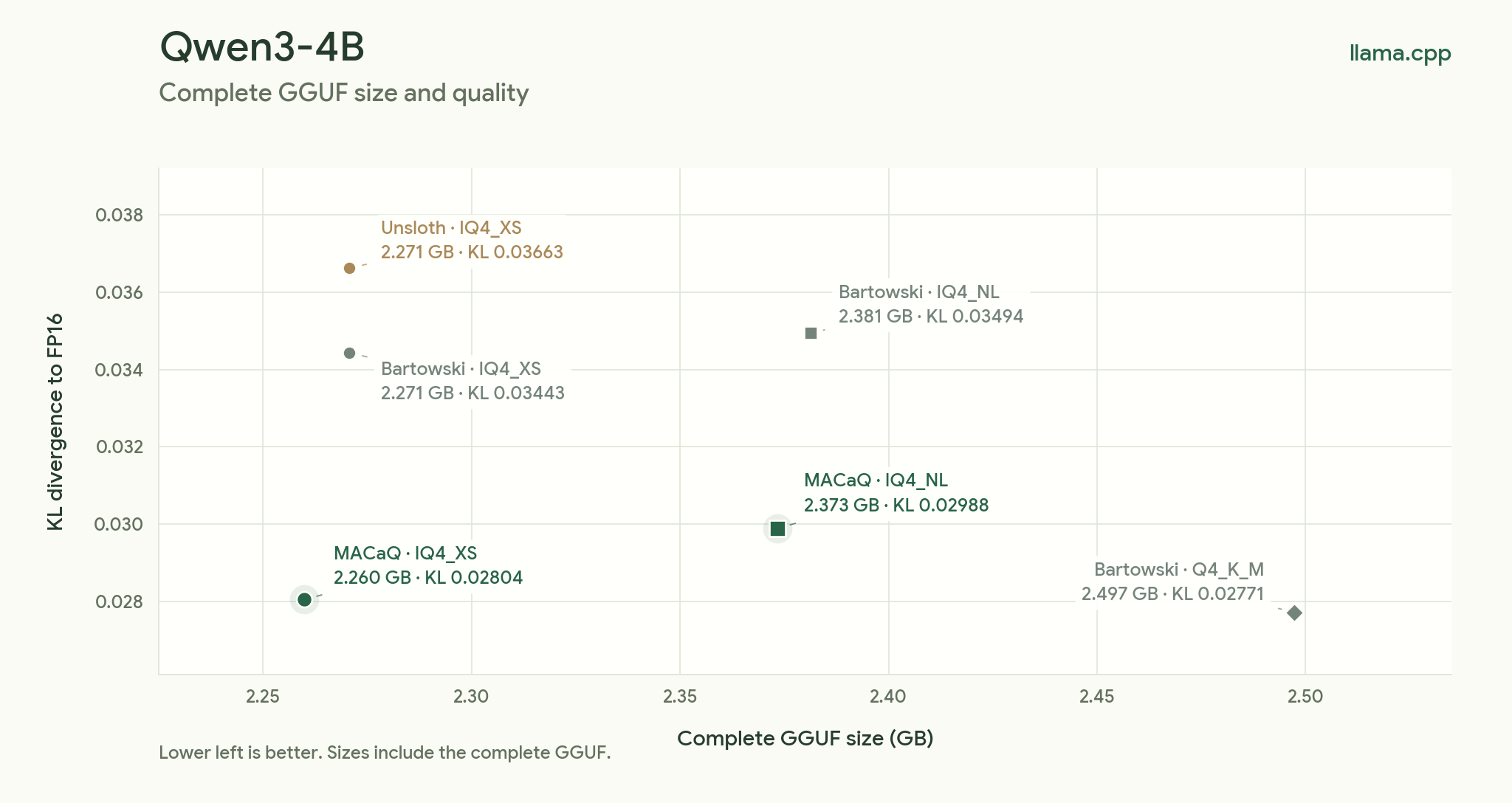
This is useful when you already have a quantized model and want to improve its quality or adapt it to a workload without changing the GGUF format. The README provides a Qwen3.6-35B-A3B MACaQ-R model on Hugging Face and reports lower KL divergence than the compared Unsloth UD-Q4_K_XL file at the same listed size.
To refine a quantized MoE GGUF, provide the quantized model, its matching original Hugging Face model, an FP16 teacher file, calibration text, an output path, and a working directory:
.venv-llamacpp/bin/python llamacpp/macaq.py refine \
  --model models/model-q4.gguf --hf models/original \
  --teacher models/original-f16.gguf --calibration data/calibration.txt \
  --output models/model-macaq-r.gguf --work-dir work/refinement
After refinement completes, load the output with standard llama.cpp:
llama cli -m models/model-macaq-r.ggufFor the complete MACaQ workflow, including activation transforms, use the bundled-runtime guide.
Quantize and serve models with vLLM
The vLLM backend creates compact text-model checkpoints for generation or HTTP serving. W4A4 is the default inference mode, and the backend also supports weight-only quantization.
Open the vLLM guide and choose the workflow for a hybrid text model or text mixture-of-experts model.
Install the vLLM backend in its own Python 3.12 environment.
Prepare the source model and calibration data required by the selected recipe.
Run the documented quantization command to create the compact checkpoint.
Load the checkpoint for local generation or start the documented HTTP server.
The README reports a Qwen3.8-27B comparison in which MACaQ W4A4 reaches a perplexity of 2.8994 compared with 2.8463 for BF16, while reporting faster prefill and decode measurements in the listed test setup.
Quantize speech generators with PyTorch
The PyTorch backend targets speech generation and saves W4A4 checkpoints. Once a checkpoint has been saved, it can be loaded without repeating calibration.
The documented workflows cover Qwen3-TTS and Chatterbox Turbo.
Open the PyTorch guide and choose the speech model.
Install the required PyTorch dependencies in a separate Python 3.12 environment.
Run calibration and quantization using the model-specific instructions.
Save the W4A4 checkpoint.
Load the saved checkpoint and generate WAV audio without recalibrating.
Use MACaQ with Ascend hardware
MACaQ W4A4 dense and grouped matrix multiplication kernels are available through CANN-related pull requests. The README points to PTO-ISA kernels in ops-nn pull request 12568 and TileLang kernels with the CCE backend in ops-tilelang pull request 44.
Follow the build instructions in those projects for compatible CANN, PyTorch, and torch_npu versions. Full-model execution requires integration with an Ascend inference runtime.
Practical tips for better workflows
- Match the backend to the deployment target. Choose GGUF and llama.cpp for portable local text inference, vLLM for text serving, Diffusers for multimodal generation, and PyTorch for speech models.
- Use model-specific recipes. Dense, hybrid, and mixture-of-experts models can require different preparation and quantization steps.
- Keep calibration data aligned with usage. For example, the Diffusers image-to-video workflow uses conditioning images during calibration.
- Separate environments. The README explicitly recommends a separate environment for each backend and Python 3.12.
- Compare quality, not only file size. The project uses perplexity and KL divergence comparisons to evaluate quantized models against FP16 or other quantization methods.
- Use MACaQ-R when you already have a GGUF. It can refine an existing quantized file while retaining standard llama.cpp compatibility.
Conclusion
MACaQ provides one quantization approach across several AI workloads, from GGUF text models to Diffusers image, video, and audio models, vLLM serving checkpoints, and PyTorch speech generators. Begin with the backend-specific README, use Python 3.12 in an isolated environment, follow the model recipe for calibration, and validate the resulting checkpoint with your intended runtime.
For research or technical documentation, see the MACaQ paper. The project is released under the Apache License 2.0.