


Setting up pi is simple—just one command. The only thing to decide first is the authentication method: use an existing subscription or an API key. This guide walks through installation, authentication, and your first conversation in one go.
Core Concept: Two Authentication Methods
After pi is installed, it needs credentials from an LLM provider to work. There are two authentication paths, and understanding the difference is the only thing you really need to figure out in this guide:
Subscription login (/login)|API key
What to use|Claude Pro/Max, ChatGPT Plus/Pro, and other subscriptions|An API key issued by a provider
Billing|Complex (subscription quota + possible additional usage)|By token: pay for what you use
Where credentials are stored|~/.pi/agent/auth.json (OAuth token, refreshed automatically)|Environment variable or auth.json
Best for|Users with an existing subscription who do not want to manage a separate key|Users who want precise cost control
One important note: Anthropic subscription login (Claude Pro/Max) uses a third-party harness channel and is billed by token; it does not consume your subscription plan quota. pi displays a warning, which is normal. If you want complete control and the ability to see exactly how much you have spent at any time, an API key is more convenient.
Hands-on Practice
1. Install pi
pi runs on Node.js and requires 22.19.0 or later. First, confirm your version with node --version. Choose either installation method:
# Install globally with npm (--ignore-scripts skips dependency scripts for better security)
npm install -g --ignore-scripts @earendil-works/pi-coding-agent

# Or use the curl installer (it will install Node if it is not already installed)
curl -fsSL https://pi.dev/install.sh | sh
After installation, verify it with pi --version. Uninstall with npm uninstall -g @earendil-works/pi-coding-agent.
2. Configure Authentication
Option 1: API key (recommended). Set the key as an environment variable:
export ANTHROPIC_API_KEY=sk-ant-...
pi
Alternatively, use /login inside pi, select an API key provider, and save the key to ~/.pi/agent/auth.json (with 0600 permissions, so only you can read or write it). Environment variables for common providers:
Provider|Environment variable
Anthropic|ANTHROPIC_API_KEY
OpenAI|OPENAI_API_KEY
DeepSeek|DEEPSEEK_API_KEY
Google Gemini|GEMINI_API_KEY
Groq|GROQ_API_KEY
xAI|XAI_API_KEY
OpenRouter|OPENROUTER_API_KEY
There are dozens of providers in the full list; see the official Providers documentation[1].
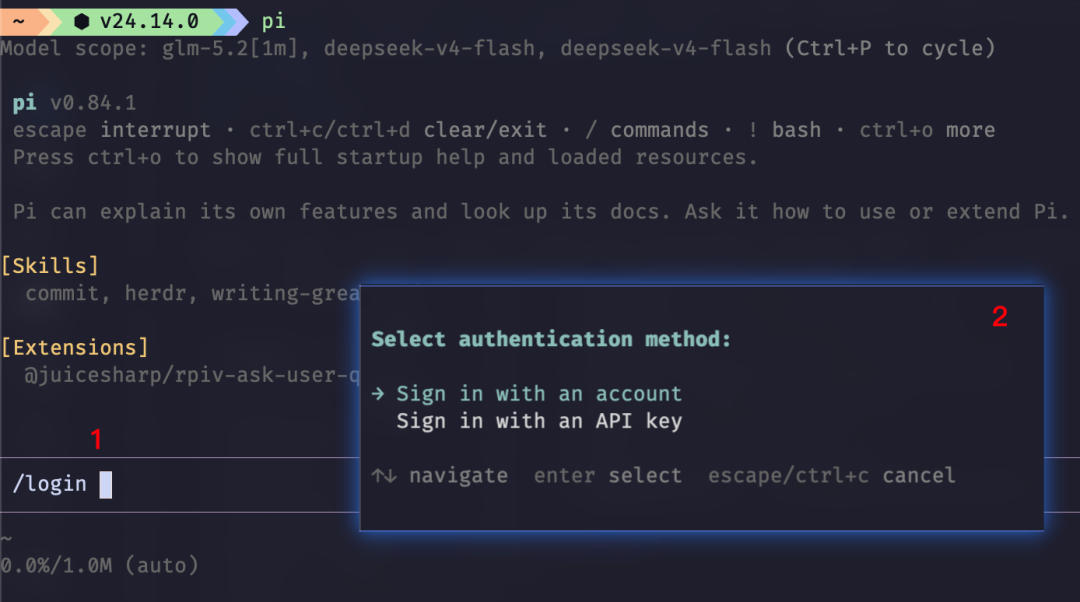
Option 2: Subscription login. If you already have a subscription such as Claude Pro or ChatGPT Plus, use /login in pi, select the corresponding provider, and complete the OAuth flow. pi refreshes expired tokens automatically. Available options include Claude Pro/Max, ChatGPT Plus/Pro (Codex), GitHub Copilot, xAI, and OpenRouter. Use /logout to log out.
The Pi community is very active, and the latest Pi Agent now supports Qwen's token plan.
Once the model is configured, use /model to choose the model you want to use.
Pi Agent also has a concept called scoped models.
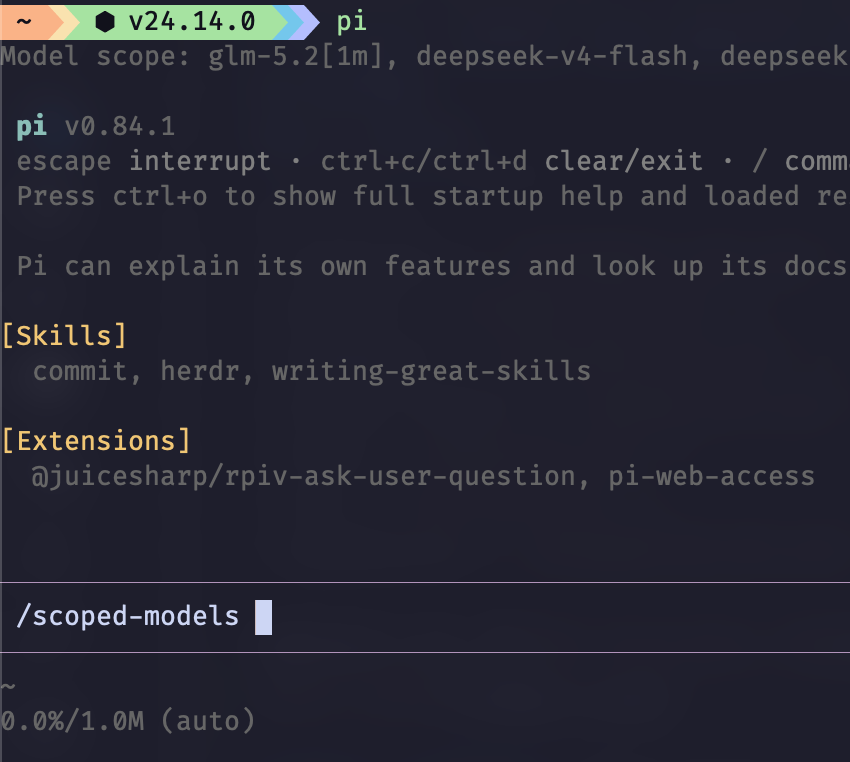
The purpose of scoped models is to let users quickly switch between several models with ctrl + p. You can also use ctrl + l to select one. The corresponding configuration is in the enabledModels field of ~/.pi/agent/settings.json.
3. Start for the First Time
Go to your project directory and start pi:
cd /path/to/your/project
pi
The first time you enter a project containing .pi/ configuration, pi asks whether you trust it. Project-level resources may include extensions capable of executing arbitrary code, so pi will not load them without your knowledge. Your trust decision is recorded in ~/.pi/agent/trust.json, so you will not be prompted again.
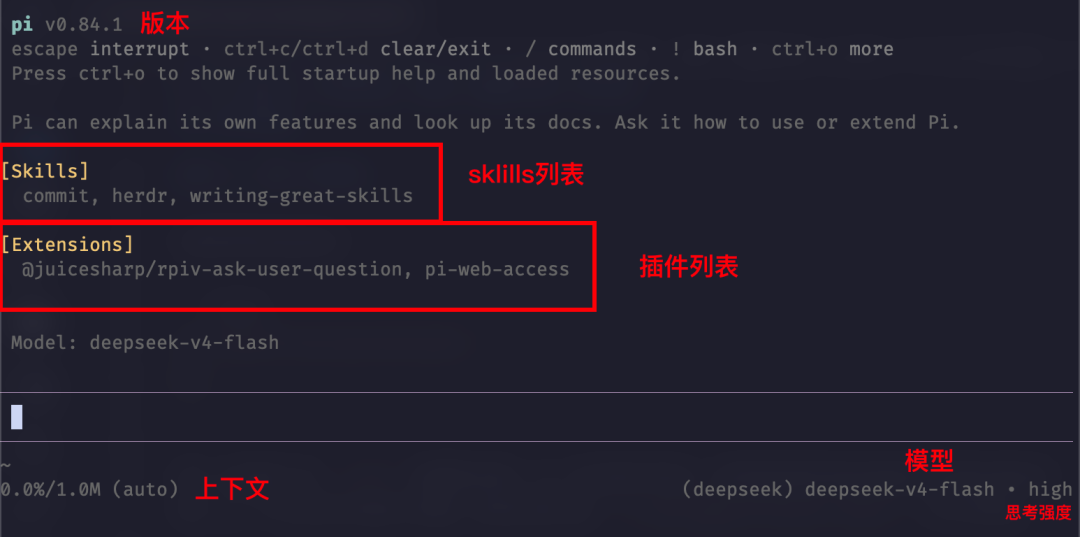
From top to bottom, the interface has four areas: Header (shortcuts and loaded resources), Messages, Editor (where you type; the border color indicates the thinking level), and Footer (directory, session, token usage, cost, and current model). Simply type and press Enter, for example:
Take a look at this repository's structure and tell me how to run its checks.By default, pi gives the model four tools: read, write, edit, and bash. Three additional read-only tools—grep/find/ls—are disabled by default. Enable them with --tools when needed. For example, to have pi perform a read-only code review:
pi --tools read,grep,find,ls -p "Review the code quality of this repository"Switch models with Ctrl+L or /model; exit by pressing Ctrl+C twice or using /quit; resume your previous conversation with pi -c.
Understanding How It Works
Authentication resolution order: When environment variables, auth.json, and command-line arguments are configured at the same time, pi uses them in this order: command line --api-key > auth.json > environment variable > models.json. To temporarily test another key, use pi --api-key xxx without changing the configuration file.
Project trust is an input guard, not a sandbox: It only displays a prompt during interactive startup. In non-interactive mode (pi -p), the default is ask; you can override it with -a/-na. pi has no sandbox by default. If the model has access to bash, it can execute any command. Untrusted repositories should be handled with container isolation, which is covered in a later security article.
Frequently Asked Questions
Q:pi --version reports “command not found,” but npm says it was installed successfully.
This is usually because npm's global bin directory is not in PATH. Run npm prefix -g to find the path and add it to PATH. If you use nvm, remember to run nvm use.
Q: pi reports that the Node version is too old at startup.
pi requires Node 22.19.0+. Upgrade using a version manager (fnm/mise/nvm), or let the curl installer install it for you.
Q: An additional usage warning appears every time after logging in with Claude Pro.
Anthropic subscriptions use a third-party channel billed by token. To disable the warning, add this to ~/.pi/agent/settings.json:
{ "warnings": { "anthropicExtraUsage":false } }Q: Shift+Enter does not insert a line break.
pi uses the Kitty keyboard protocol to recognize modifier keys. iTerm2, Kitty, and Ghostty work without configuration, and VS Code 1.109.5+ supports it by default. Windows Terminal, WezTerm, and Alacritty require a line of configuration to be added manually to forward key presses; see the terminal configuration documentation[2].
Q: I want to work completely offline without connecting to pi.dev to check for updates.PI_OFFLINE=1 disables all network operations during startup. To disable only version checks, use PI_SKIP_VERSION_CHECK=1.
References
• Pi Quickstart documentation[3]
• Pi Providers documentation[1] - All providers, environment variables, and cloud provider configuration
• Pi Custom Models documentation[4] - Custom providers in models.json
• Pi Settings documentation[5]
• Pi Terminal Setup[2] - Key configuration for different terminals
• Pi GitHub repository[6]
Reference links
[1] Official Providers documentation: https://pi.dev/docs/latest/providers[2] Terminal configuration documentation: https://pi.dev/docs/latest/terminal-setup[3] Pi Quickstart documentation: https://pi.dev/docs/latest/quickstart[4] Pi Custom Models documentation: https://pi.dev/docs/latest/models[5] Pi Settings documentation: https://pi.dev/docs/latest/settings[6] Pi GitHub repository: https://github.com/earendil-works/pi