

- Monthly visits
- 0
- Pricing
- Free
- Listed
- 2026-05-25
- Updated
- 2026-08-25
01Product Positioning
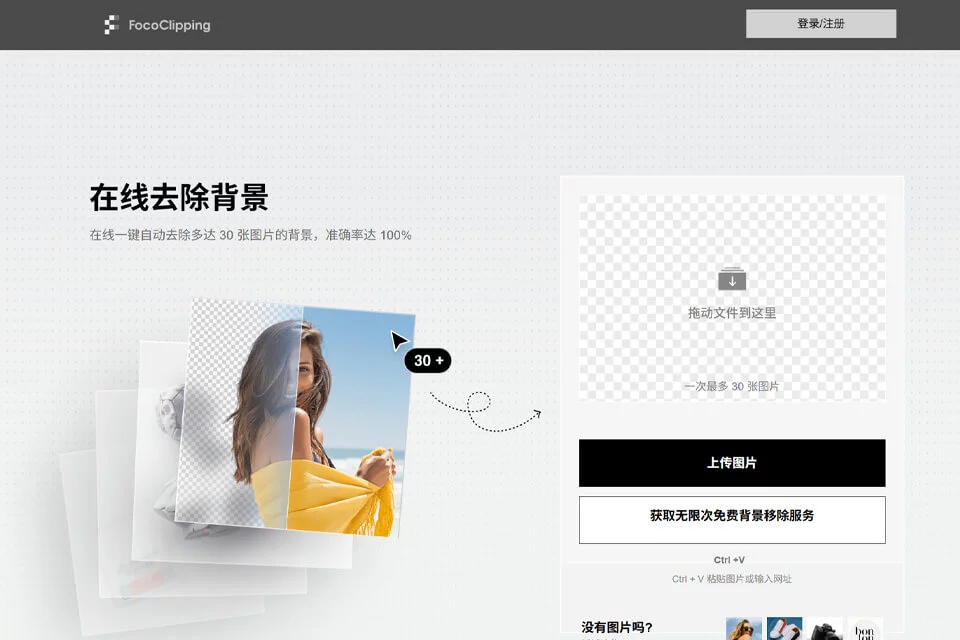
FocoClipping is positioned as an online AI background removal tool. Its core task is to identify the subject in an image and remove the background. It is better suited to background removal and basic image preparation than to serving as a comprehensive image editing application covering the entire design workflow.
Users typically only need to upload an image, wait for automatic processing, and then download or continue adjusting the result. The web-based workflow eliminates the need to install local software, although actual use depends on the network environment.
02Key Features
The tool supports automatic background removal. Results can be exported with a transparent background or replaced with a solid-color or custom background. According to the available information, it can process common subjects such as products, portraits, and multiple people, and it provides edge refinement features.
When automatic recognition is not accurate enough, users can use brushes to mark areas to keep or remove. The tool also supports batch processing of up to 30 images at a time and provides basic editing options such as adding shadows, borders, and background templates.
03Use Cases
E-commerce sellers can use it to process product images and create white-background or transparent-background assets. Designers and photographers can use it for the preliminary preparation of portrait and product assets, reducing repetitive manual cutout work.
Content creators can use transparent-background images to create profile images, product graphics, or social media content. The batch processing feature is especially suitable for individuals and small teams that need to prepare multiple product or promotional images in succession.
04Usage Considerations
The quality of automatic background removal depends on how clearly the subject can be distinguished from the background. For images with hair, glass, or other transparent or finely detailed edges, overlapping people, or complex backgrounds, users should zoom in and inspect the edges before downloading and use the manual correction tools to fix misidentified areas.
For projects requiring strict pixel-level control, complex layer editing, or precise color management, FocoClipping can be used for the background removal stage, while professional image editing software may still be needed for subsequent compositing and adjustments.
© Disclaimer: domains and linked content may change over time. AIEZZ does not control third-party websites. Review external content and risks independently.
User reviews0