
- Monthly visits
- 0
- Pricing
- Not set
- Listed
- —
- Updated
- 2026-11-06
01What Is Step Studio
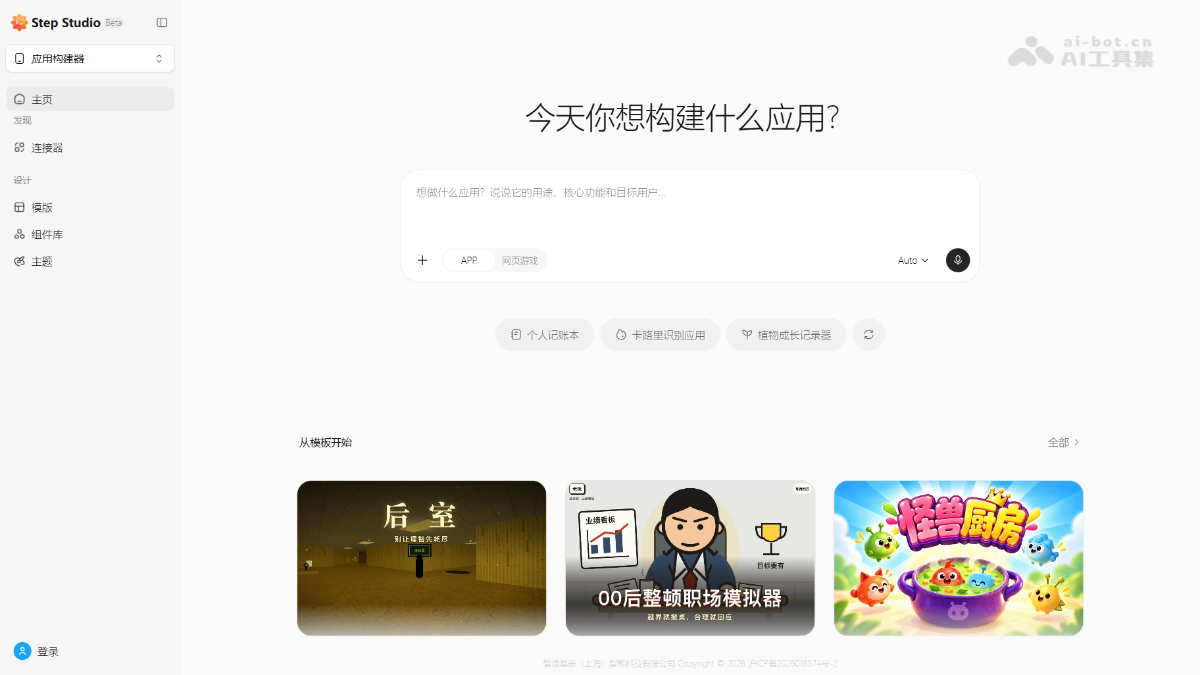
Step Studio is an AI application-building workspace launched by Step Star. Users describe the purpose, features, and target audience in natural language to generate usable apps, web games, agents, or plugins. They can also start from templates, components, and color themes to quickly build an initial version, then improve it through ongoing iterations. In addition to common tools such as maps and office applications, Step Studio can access the hardware and system capabilities of StepX phones, allowing developers' apps and agents to control the phone directly.
02Key Features of Step Studio
App and game building: Describe the purpose, features, and target users, then choose an app or web game type. AI directly generates an initial project as a starting point for iteration.
Agent building: Describe in natural language the tasks you want an assistant to handle, or get started with examples for travel, knowledge organization, and social media creation to quickly build a conversational task assistant.
Skill creation and iteration: Describe a skill's use case, or start with ideas such as translation and Git standards checks to create and continuously improve skills that agents can call.
Connector integration: Add tools such as maps and office applications to a project. Connectors for StepX phones can access hardware and system capabilities, serving as a core differentiator from similar platforms.
Template-based starts: Choose a relevant example from productivity, e-commerce, and game templates to begin building, reducing the cost of designing page and feature structures from scratch.
Component and color references: Select interface components such as cards, buttons, and navigation, then choose a color theme to provide interaction and visual references and refine the page presentation.
03How to Use Step Studio
Choose a building entry point: Visit the Step Studio website at https://studio.stepx.com/ and select one of three entry points in the upper-left corner: App Builder, Agent Builder, or Skill Builder.
Describe your requirements: Explain the purpose, core features, target users, or task scenario in text. When building an app, also choose whether the output should be an app or a web game.
Choose scaffolding and tools: Start from the template library as needed, browse components and color themes, or select the tools you need from the connector directory.
Create and iterate: Follow the guidance in the project interface to continue creating and iterating, gradually improving features and details.
Test on a real device: If the project involves phone hardware or system capabilities, switch to the corresponding StepX environment for real-device testing.
04Core Advantages of Step Studio
Unique software-and-hardware integration: Connectors can directly access the hardware and system capabilities of StepX phones. It is currently the only product that connects an agent-building platform with its own phone ecosystem.
Zero-barrier natural-language building: A single-sentence description can generate an app, web game, or agent, enabling non-professional developers to turn ideas into a functional initial version.
Templates and components help ensure quality: Built-in templates, component libraries, and color themes constrain the generation space, reducing the likelihood of flawed code and uncontrolled output.
Completely free during public beta: The current version allows cost-free experimentation, making it friendly to independent developers and small teams.
Backed by Step's full-stack capabilities: Powered by the Step series of large models, it belongs to the same ecosystem as the model APIs and StepX, keeping iteration and collaboration costs low.
05Step Studio Use Cases
Game prototype validation: Independent developers generate web game prototypes with a single sentence, quickly validate gameplay, and then iterate toward complete works.
Social media content production: Content creators build social media creation agents to handle topic selection, copywriting, and scheduling in batches.
Product idea demonstrations: Product managers can turn an idea for a productivity tool into an interactive initial app without writing code, for demonstrations and reviews.
Reusable skill development: Developers create reusable skills such as translation and Git standards checks for their own agents or for others to use.
Native phone app development: Advanced users integrate StepX connectors so apps can directly access phone hardware and system capabilities, creating agent applications that are “native to the phone.”
© Disclaimer: domains and linked content may change over time. AIEZZ does not control third-party websites. Review external content and risks independently.
User reviews0