
- Monthly visits
- 0
- Pricing
- Not set
- Listed
- —
- Updated
- 2026-10-31
01What is ThinkRail
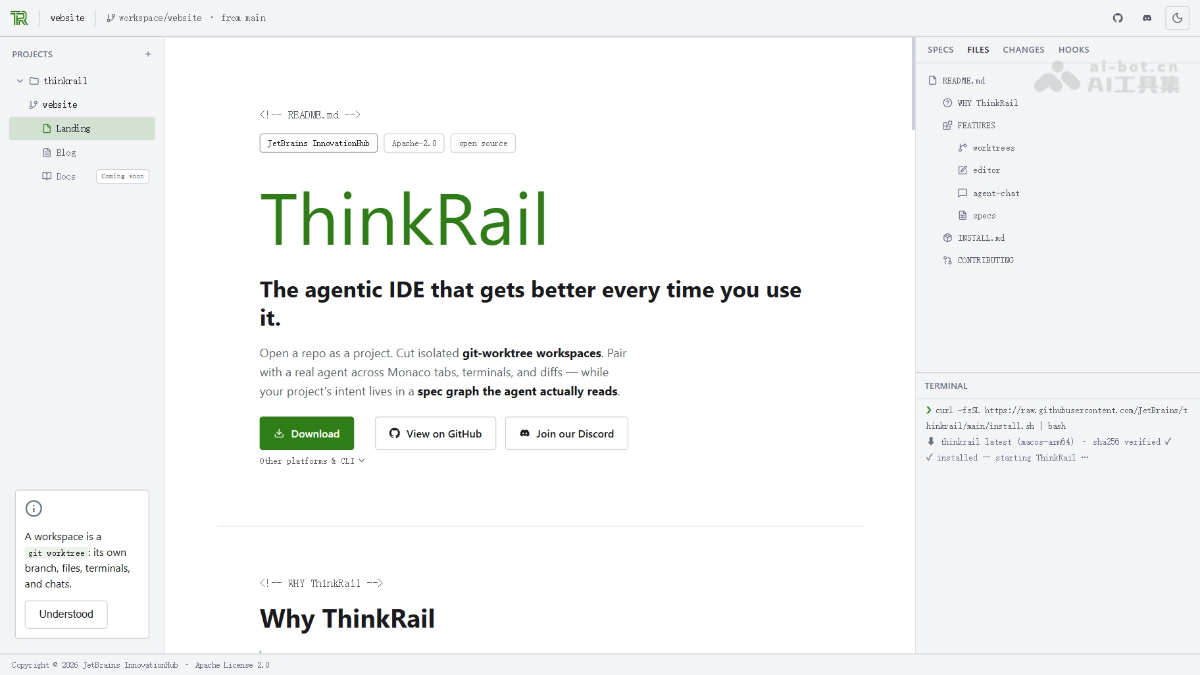
ThinkRail is JetBrains' open-source AI agent IDE, wrapping the pi coding agent in a complete IDE interface. ThinkRail uses git worktrees to isolate each task in its own branch and directory, allowing multiple Agents to work in parallel without interfering with one another or polluting the main branch. It also uses a SPEC.md specification graph to preserve project intent as files versioned alongside the code, solving the problem of Agents forgetting context during conversations.
02Key Features of ThinkRail
Follow us on WeChat and reply “开源” to join the AI open-source project community
Worktree isolation: Each task gets its own git worktree, allowing Agents to work in parallel without interference while keeping the main branch clean.
SPEC.md specification graph: Project intent is written into markdown files with frontmatter and connected into a graph that Agents can search and maintain, providing persistent project memory.
Parallel sessions: Run multiple sessions simultaneously in the same workspace, each using its own model. Supports interruptions and queued prompts, with tokens and costs visible in real time.
Hunk-by-hunk review: Changes from each round are split into hunks that can be kept, reverted, or marked as reviewed individually.
Complete IDE interface: Built on the Monaco editor, with a file tree showing git change markers, worktree-level terminals, and live diffs.
MCP tool integration: Supports mcp.json configuration. Confirmation is required before non-read-only tool calls, and repository-provided servers are disabled by default.
Workspace lifecycle management: Idle workspaces are automatically moved to the Settled shelf. The top bar lets you publish branches, push changes, create PRs, and view CI status directly.
Flexible configuration: Supports custom model providers, multilingual interfaces, and themes, with the option to disable data collection entirely.
03How to Use ThinkRail
Install: On macOS/Linux, run curl -fsSL https://raw.githubusercontent.com/JetBrains/thinkrail/main/install.sh | bash. On Windows, use the corresponding PowerShell command, or download the desktop installer directly.
Prepare the environment: Make sure git is installed locally and that you have valid credentials for a model provider.
Start a project: Run thinkrail ~/code/my-repo to open an existing repository, or create/clone a git repository as a project in the first-launch wizard.
Connect a model: Sign in to JetBrains AI through the first-launch wizard or enter your own provider key, then complete the connection verification.
Create workspaces: Create multiple git worktree workspaces from the project with one click, each corresponding to an independent branch and task.
Start a session: Open chat in a workspace, select a model, and describe the task. The Agent will begin working on the isolated branch.
Collaborate in parallel: Run multiple sessions for different tasks at the same time, interrupting them to change direction or queue the next prompt whenever needed.
Review changes: After each round, confirm, revert, or mark changes individually by hunk in the Review view.
Validate and merge: After tests pass, merge successful branches back into the main branch and delete failed workspaces, keeping the repository clean.
04Core Advantages of ThinkRail
Worktree-level isolation: Each task runs in its own git worktree, allowing multiple Agents to work in parallel without interference while keeping the main branch clean and always revertible.
Persistent SPEC.md memory: Project intent is preserved as a specification graph in the repository, so Agents retain context across sessions.
Real review control: Changes are laid out hunk by hunk for individual review instead of being dismissed with a simple “done.”
Transparent and controllable: pi runs in-process and never constructs prompts privately. Models, costs, and tokens remain visible throughout, and MCP calls require confirmation.
Parallel sessions: Run multiple sessions in the same workspace with separate models, with smooth support for interruptions, queued prompts, and switching between sessions.
05ThinkRail Project Links
Project website: https://thinkrail.ai/
GitHub repository: https://github.com/JetBrains/thinkrail
06ThinkRail Use Cases
Parallel task development: Have multiple Agents simultaneously develop new features, fix bugs, and conduct technical research, each isolated in its own worktree without blocking the others.
Legacy project modernization: Use the SPEC.md specification graph to have Agents first map the architecture of legacy code and then refactor it module by module, preserving intent in the repository so it is not forgotten during conversations.
Code security review and controlled changes: When you do not want to give AI full control of a critical repository, enable hunk-by-hunk review so that changes are retained only after manual confirmation.
Multi-person and multi-team collaboration: Share the same project spec graph while different developers work in their own workspaces in parallel, making it easy to merge good branches and discard bad ones.
Parallel solution validation: Create multiple workspaces for the same requirement and have Agents using different models or approaches each implement a version, then compare them and merge the best one.
© Disclaimer: domains and linked content may change over time. AIEZZ does not control third-party websites. Review external content and risks independently.
User reviews0