
- Monthly visits
- 0
- Pricing
- Not set
- Listed
- —
- Updated
- 2026-10-22
01What is BaoCut?
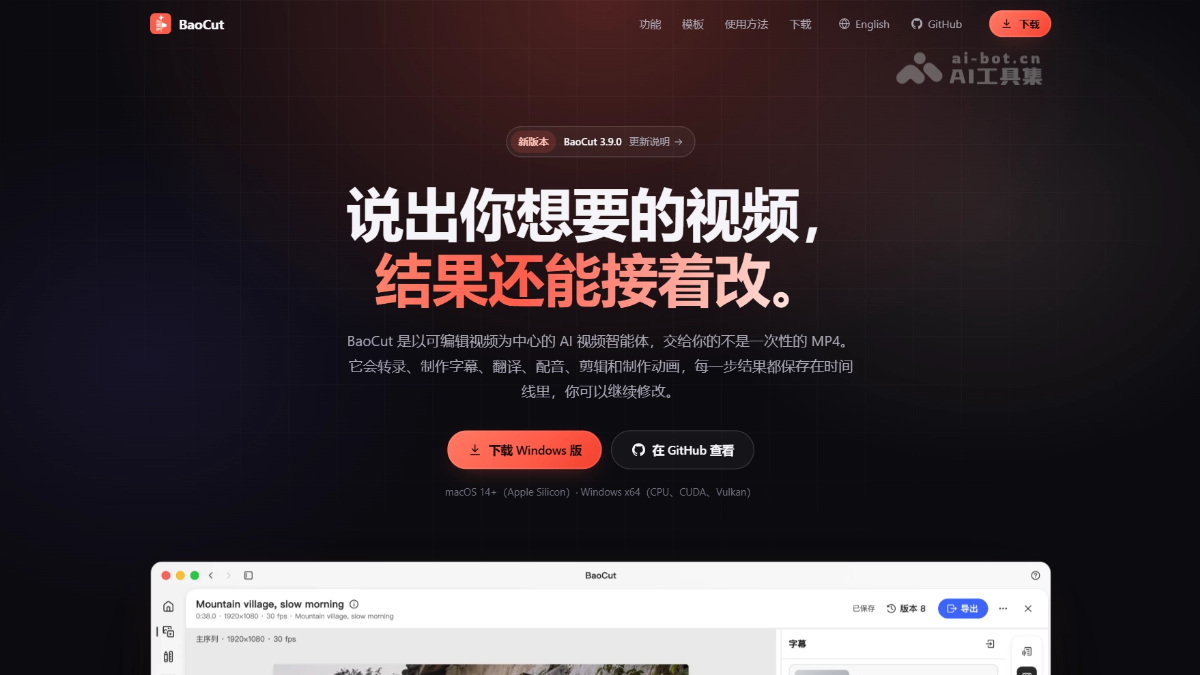
BaoCut is Baoyu's open-source AI video Agent tool. It supports transcription, translation, voiceover, talking-head editing, and motion effects. Each revision changes only the specified sentence or shot, without re-rendering the entire video. Humans and Agents share the same editor and can take over from each other at any time. BaoCut supports popular Agents such as Claude Code and Kimi Code. Models can run locally or connect to cloud APIs, and the complete range of export formats makes it suitable for creators and developers who want to refine video content with precision.
02BaoCut's Main Features
Follow on WeChat and reply “开源” to join the AI open-source project community
Transcription: Transcribe audio and video locally with Whisper / Qwen3-ASR / MOSS or through cloud APIs, with word-level timestamps that flow into the timeline as transcription progresses.
Subtitle translation: The Agent translates sentence by sentence and generates original-language, translated, or bilingual subtitles. Click any sentence to edit it individually.
Cross-language voiceover: After translation, automatically separate vocals from the background and synthesize a new audio track sentence by sentence using cloned or preset voices, then place it on the timeline.
Talking-head editing: Automatically identify filler words, long pauses, and unnecessary sentences and cut them from the timeline without affecting the original footage.
Derived content: Generate chapters, summaries, titles, blog posts, and short-video clips from timestamped transcripts.
Template-based video generation: Includes 24 scene templates that can produce a complete video from a single prompt.
Voiceover-first production: Synthesize the complete voiceover first, then automatically edit the visuals to match its pacing.
Motion effects as code: The Agent writes HTML animations and bakes them into frames on the timeline.
03How to Use BaoCut
Download and install: Visit the official BaoCut website https://baocut.com/zh-hans/ and download the appropriate version (on macOS Apple Silicon, drag it into Applications; on Windows, install VC++ v14 Redistributable first, then run the installer).
Install ffmpeg: Media transcription and export require ffmpeg and ffprobe in the system PATH (not included in the installer).
Sign in to an Agent engine: Open the app and sign in to Claude Code or Codex CLI; other engines are also available.
Download local models: On first use, download the required models in Settings.
Create a session: On the Home page, describe your needs, drag in media, or choose a template. You can specify the Agent engine and access mode.
Give instructions: Describe your needs in natural language, such as “Transcribe this video and add bilingual subtitles.” The Agent automatically plans the steps and executes them on the timeline.
Review and revise: Preview the result in the timeline editor, click any subtitle to edit it directly, or ask the Agent to redo only a specific sentence.
Export and deliver: Once confirmed, export an MP4, SRT, or portable .baocut project package. You can continue editing on another device.
04BaoCut's Core Advantages
Local revisions without re-rendering: Whether you change a subtitle, replace a shot, or re-record a voiceover sentence, the Agent edits only that part while leaving everything else unchanged, with a change receipt included.
The video is the single source of truth: Subtitles, voiceovers, chapters, and motion effects all live on the timeline. MP4 and SRT files are simply snapshots that can be exported at any time.
Human and Agent share the editor: You and the Agent use the same command protocol, transactions, and undo stack, so either can take over at any time.
Freedom of Agent engines: Claude Code and Codex are validated end to end. Kimi Code, Gemini CLI, and others connect through the ACP protocol, avoiding vendor lock-in.
Complete model decoupling: Choose from local MLX / whisper.cpp models or more than 15 cloud providers. You can even share a machine's local models with other devices over a local network.
05BaoCut Project Links
Project website: https://baocut.com/
GitHub repository: https://github.com/JimLiu/baocut
06BaoCut Use Cases
Cross-language video localization: Give an English tutorial or talk to the Agent and it automatically handles transcription, sentence-by-sentence translation, and cloned-voice dubbing to produce a localized version with bilingual subtitles. If one sentence is mistranslated, revise only that sentence.
Efficient editing of talking-head videos: Automatically remove filler words, long pauses, and unnecessary sentences from recorded courses or interviews without touching the original footage, producing a clean final video in minutes.
Turn long videos into short videos: Generate chapters, summaries, and highlight clips from timestamped transcripts, quickly turning a one-hour podcast into multiple short-video assets ready to publish.
Rapid production of product promotional videos: Start with a one-sentence brief and let the Agent use built-in templates to complete the script, voiceover, visual editing, and motion effects, then export a 9:16 promotional clip.
Remote team video review: After the Agent edits the video on the local timeline, it generates a one-time Web link. Remote colleagues can open the editor directly in a browser to review the changes without transferring large files.
© Disclaimer: domains and linked content may change over time. AIEZZ does not control third-party websites. Review external content and risks independently.
User reviews0