
- Monthly visits
- 0
- Pricing
- Not set
- Listed
- —
- Updated
- 2026-10-02
01What Is OpenViking
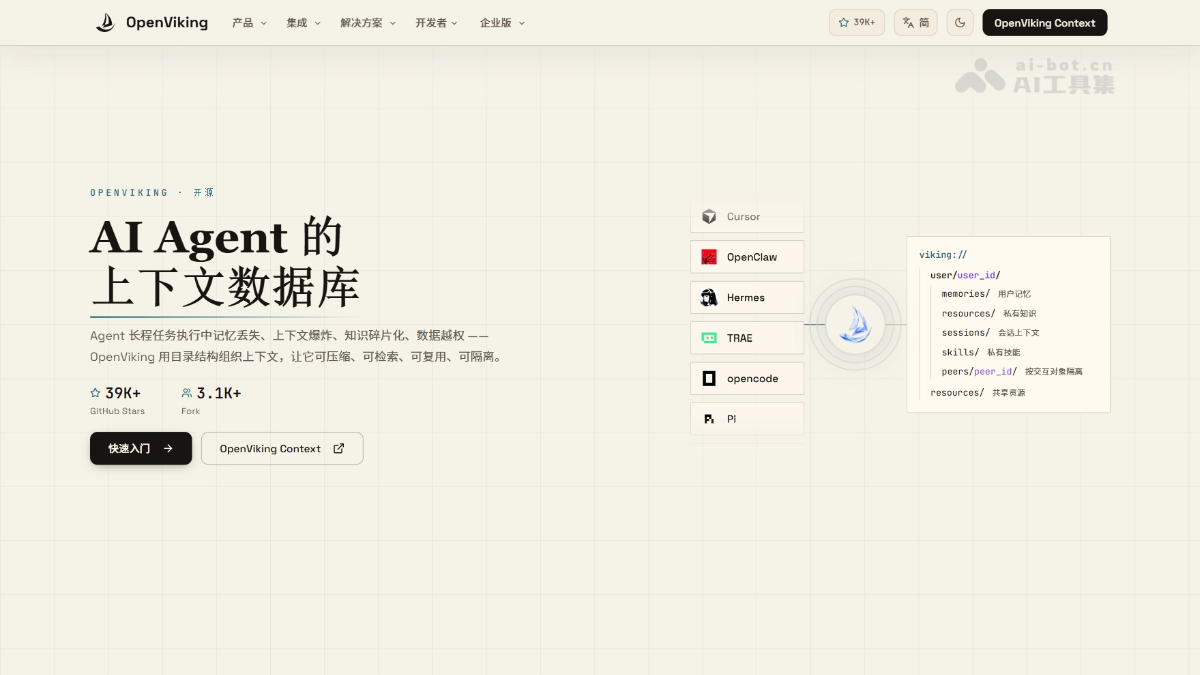
OpenViking is an open-source AI Agent context database from Volcano Engine, ByteDance. It organizes Agent memory, knowledge RAG, and skills in a custom viking virtual file system, allowing Agents to browse and retrieve context with ls/tree/find/grep just like operating files. It uses three levels of progressive loading: L0 summaries, L1 overviews, and L2 details. It also supports directory-level semantic search, significantly reducing token consumption.
02Key Features of OpenViking
Follow us on WeChat and reply “开源” to join the AI open-source project community
Unified context file system: The custom viking:// protocol organizes memories, knowledge resources, and skills as virtual files. Agents can directly browse and edit them with commands such as ls/tree/read/grep.
Three-level progressive loading: Each directory automatically generates an L0 summary, L1 overview, and L2 complete content. Agents first assess relevance from the summary and load more as needed, greatly reducing token consumption.
Directory-level semantic search: Supports find and search, allowing the search scope to be limited to a project or memory subtree instead of scanning the entire database.
Sessions persisted as files: After a session is submitted, conversations are automatically archived and memories are extracted into inspectable and editable Markdown. VikingBot can also compile materials into wikis, knowledge graphs, or reports.
Multi-Agent access: Natively integrates with mainstream Agents such as Claude Code, Codex, Cursor, and OpenClaw, while also providing MCP, the Agent Plugin 1.0 standard plugin, and Python/Go/TS SDKs.
Studio visualization: Provides browser-based OpenViking Studio and a self-hosted web version for visually browsing context and trying semantic search online.
Multi-user support and permission isolation: The server supports multiple accounts, user-level isolation, and optional resource ACL access control, making it suitable for team deployments.
03How to Use OpenViking
Installation: Run pip install openviking --upgrade to install the main package.
Initialization: Run openviking-server init to configure the model provider.
Check the environment: Run openviking-server doctor to verify the configuration and model connectivity.
Start the service: Run openviking-server to start the local server.
Import resources: Use ov add-resource to import GitHub repositories or documents, then run ov task status and wait for indexing to complete.
Browse and search: Use ov ls and ov tree to browse the directory structure, ov find "question" for semantic search, and ov grep for text matching.
Try the conversation experience: For the built-in Agent, run pip install "openviking[bot]", then openviking-server --with-bot, and use ov chat to start a conversation.
04Core Advantages of OpenViking
Transparent context: Memories, knowledge, and skills are unified in the viking:// file system. You can open and edit directories at any time to see what the Agent “knows,” eliminating the “text in, embeddings out” black box.
Precise directory-level retrieval: Semantic search can be restricted to a project or memory subtree, avoiding the noise caused by scanning the entire database.
Exceptional token efficiency: L0/L1/L2 progressive loading lets Agents read summaries before full content. In LoCoMo evaluations, input tokens decreased by 34%~91% and latency decreased by 58%~66%.
Significant performance gains: After integration, the long-term memory accuracy of the Claude Code, Hermes, and OpenClaw base systems all increased from 24~57% to 80%+.
Reusable persisted memories: Sessions can be submitted and archived as Markdown with memories extracted automatically. ov compile can also organize materials into wikis, knowledge graphs, or reports.
Broad ecosystem integration: Natively supports more than ten mainstream Agents, including Claude Code, Codex, Cursor, OpenClaw, and Hermes, and provides the general MCP and Agent Plugin 1.0 standards.
05OpenViking Project Links
Official website: https://openviking.ai/
GitHub repository: https://github.com/volcengine/OpenViking
06OpenViking Use Cases
Intelligent coding assistants: Import code repositories and documents into viking://resources/. Agents retrieve information by directory and remember developers’ coding habits, enabling continuous project follow-up across sessions.
Multi-Agent collaboration: Use the peers directory to isolate context for different interaction partners and share team knowledge through the resources directory. Multiple Agents can collaborate on the same file system.
Sales and customer service: Store customer preferences and historical communications in the user memory directory. Sales Agents can recall customer information across sessions, improving the success rate of multi-step business tasks.
Video and content creation: Organize storyboards, asset libraries, and brand guidelines as context resources. Agents retrieve materials by project and remember the creator’s style to support consistent long-term creation.
Recommendation system diagnosis: Import strategy documents, badcase records, and experiment logs. Diagnostic Agents retrieve evidence within directory scopes, identify problems with fewer tokens, and generate analysis reports.
© Disclaimer: domains and linked content may change over time. AIEZZ does not control third-party websites. Review external content and risks independently.
User reviews0