
- Monthly visits
- 0
- Pricing
- Not set
- Listed
- —
- Updated
- 2026-09-13
01What is Amazon Quick?
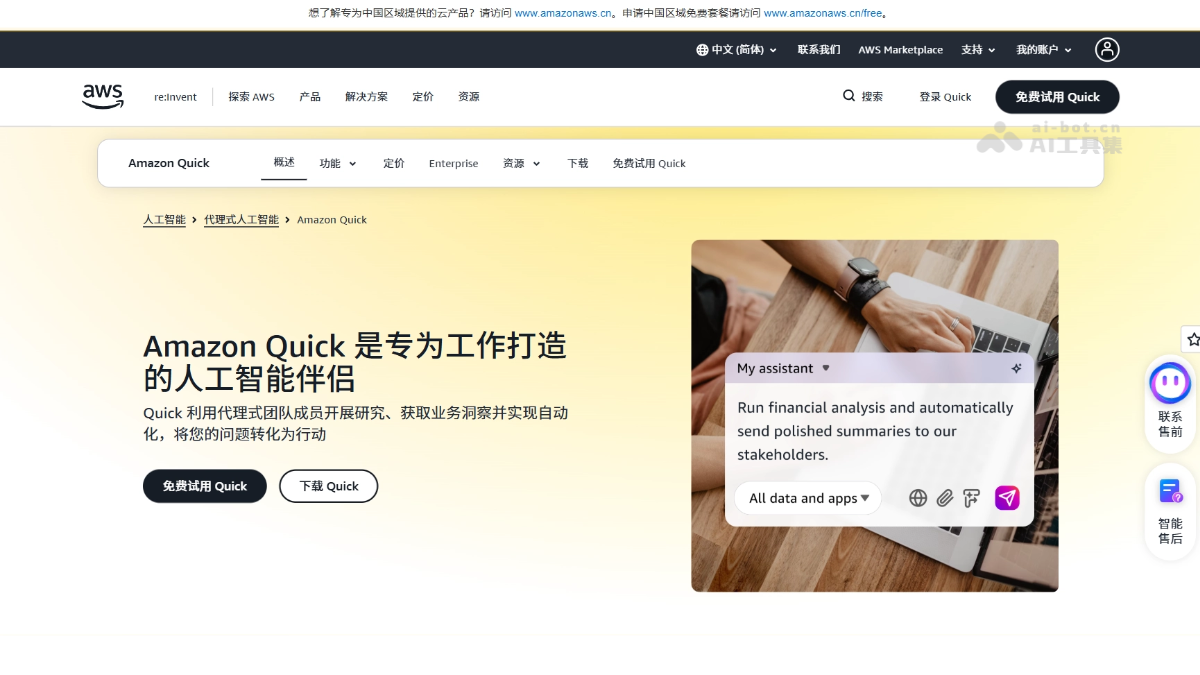
Amazon Quick is an enterprise AI work assistant launched by Amazon Web Services. Centered on desktop clients (macOS/Windows) and complemented by a smart mobile activity feed, it aggregates email, calendars, CRM, and more into a high-priority view. Background agents handle routine tasks, leaving only matters that require human decisions. Amazon Quick integrates information across systems, drafts deliverables, and automatically follows up to see tasks through to completion. Data remains in the enterprise's local environment, conversations are isolated throughout, and HIPAA, FedRAMP, SOC 2, and ISO 27001 compliance are built in with end-to-end auditing, allowing integration with the existing IT environment without system migration.
02Key Features of Amazon Quick
Desktop clients: Native macOS and Windows desktop clients are officially available and ready to use out of the box.
Smart Activity Feed: The mobile experience aggregates email, calendars, CRM, and instant messaging into a unified high-priority view that shows only matters requiring immediate human decisions.
Background agents: Agents handle routine tasks autonomously, freeing employees from endless information screening.
Natural-language Q&A: Ask complex business questions in natural language and receive reliable answers grounded in business facts within seconds.
Automatic task execution: Integrate information across systems, draft deliverables, update business records, and advance follow-up tasks, seeing work through rather than merely offering suggestions.
Collaborative workspace: Dashboards, agents, and automated workflows built by any team member can be shared and reused by the entire team.
Fully private data: Data always remains in the enterprise's own controlled environment, conversations stay isolated throughout, and every action is traceable and auditable.
Authoritative compliance certifications: HIPAA, FedRAMP, SOC 2, ISO 27001, and other compliance certifications are built in from launch.
End-to-end auditing: Obtain complete audit logs through Amazon CloudWatch and CloudTrail.
Seamless integration with existing systems: Works directly with the enterprise's existing tools and infrastructure, requiring no system migration and delivering value from day one.
Cross-device collaboration: Matters organized on a phone can be picked up seamlessly on a laptop, and after-hours automated wrap-up can be handled at any time.
03How to Use Amazon Quick
Sign up and get started: Visit the Amazon Quick website at https://aws.amazon.com/cn/quick/ and register an account for an overseas region with your email address.
Download the clients: Download the macOS / Windows desktop client from the official website, or install the mobile App for iOS / Android.
Connect existing systems: Quick works directly with existing enterprise tools such as email, calendars, CRM, and instant messaging, with no system migration required.
Ask questions in natural language: Enter complex business questions as you would in a chat and receive credible answers grounded in enterprise business facts within seconds.
Review the smart activity feed: Browse aggregated high-priority matters on mobile and quickly approve or reply without switching between multiple Apps.
Delegate execution to agents: Create asynchronously running autonomous agents to draft deliverables, update business records, and automatically follow up on subsequent tasks.
Continue seamlessly across devices: Handle matters on your phone while commuting, then pick up the progress on your laptop before a meeting and continue moving work forward.
Share and reuse across the team: Share completed dashboards, agents, and automated workflows with the entire team so one person can build and everyone can benefit.
Retain final decision authority: You always make the critical decisions, while Quick handles the remaining heavy workload.
04Core Advantages of Amazon Quick
Addressing the shadow AI challenge: Provides compliant workplace AI on existing IT infrastructure, so employees do not need to bypass enterprise systems to use external AI tools privately.
Fully private data: Data always remains in the enterprise's own controlled environment, conversations stay isolated throughout, and every action is traceable and auditable.
Authoritative compliance out of the box: HIPAA, FedRAMP, SOC 2, ISO 27001, and other enterprise compliance certifications are built in from launch.
From answers to execution: Integrates information across systems, drafts deliverables, updates records, and advances tasks to completion.
Noise reduction through the smart activity feed: Aggregates email, calendars, CRM, and instant messaging, showing only high-priority matters requiring human decisions while background agents handle routine tasks automatically.
Activity feed that evolves: Continuously learns users' collaboration relationships, business priorities, and work habits to surface what is most important rather than what is newest.
Second-level insights in natural language: Employees ask questions in natural language and receive reliable answers grounded in business facts within seconds, eliminating waits for custom reports.
Collaborative sharing multiplies productivity: Dashboards, agents, and automated workflows built by any team member can be shared and reused by the entire team.
05Amazon Quick Use Cases
Intelligent meeting preparation: With a single instruction, Quick automatically organizes customer information and generates a complete meeting brief.
Commuting task management: Approve brief additions and reply to opportunity review requests on your phone without switching between multiple Apps.
Central task console: Seamlessly pick up progress from your phone on a computer before a meeting and distribute the finalized brief to the project team with one click.
Automated end-of-day wrap-up: Have Quick polish and send customer follow-up emails, then automatically prepare the next day's work schedule.
Rapid prototyping: Domain experts can build a working prototype in days, instead of the weeks previously required, and directly deliver a standardized solution to the engineering team.
© Disclaimer: domains and linked content may change over time. AIEZZ does not control third-party websites. Review external content and risks independently.
User reviews0