

Alpha warning: useAgent is under active development. APIs and schemas may change between releases, so pin a release tag when stability is important.
What is useAgent?
useAgent is an open-source AI coworker platform for running agents such as Claude Code, Codex, and OpenCode. Rather than returning only conversational answers, agents work in isolated Linux environments and can deliver completed websites, presentations, spreadsheets, research reports, and tested pull requests.
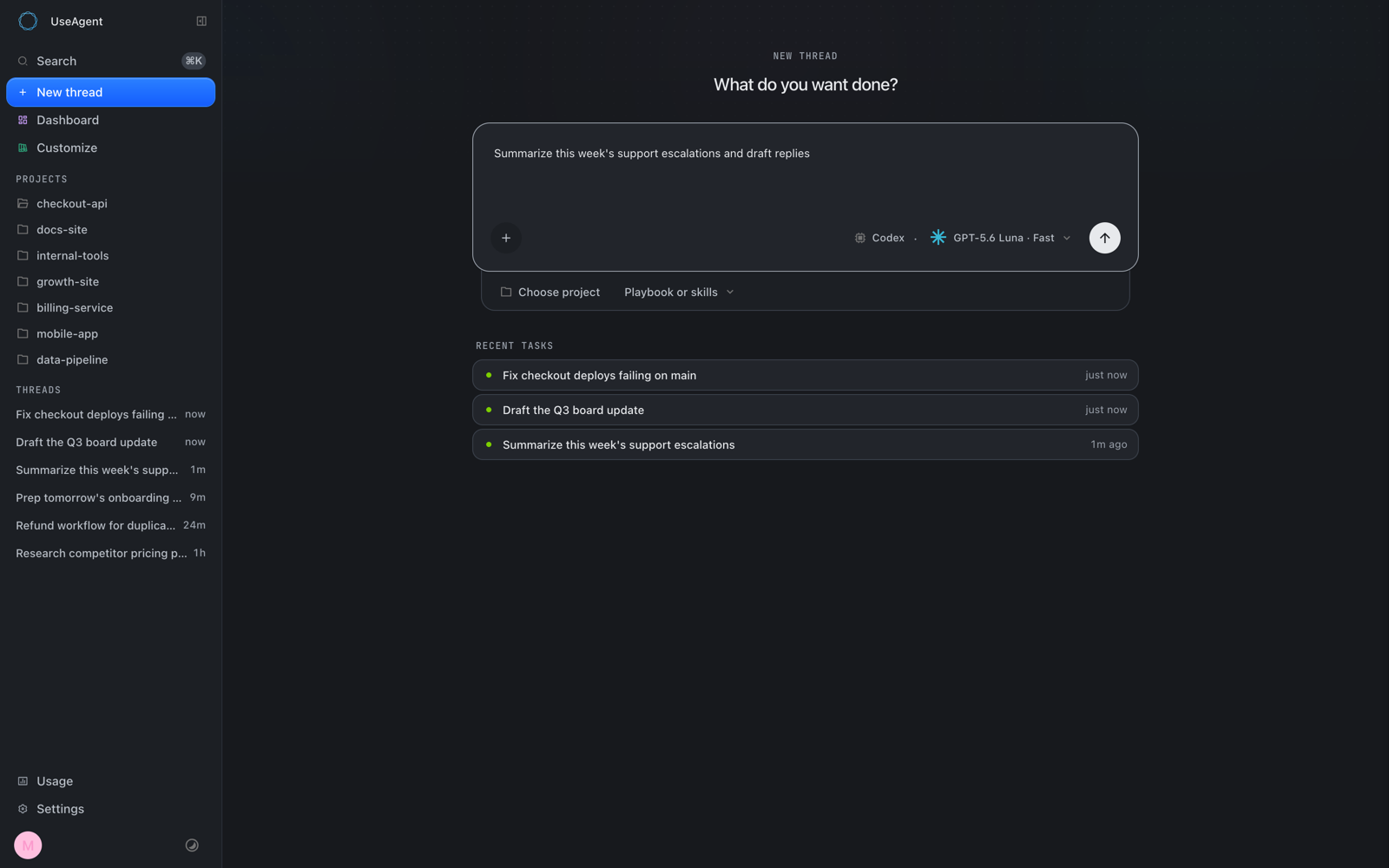
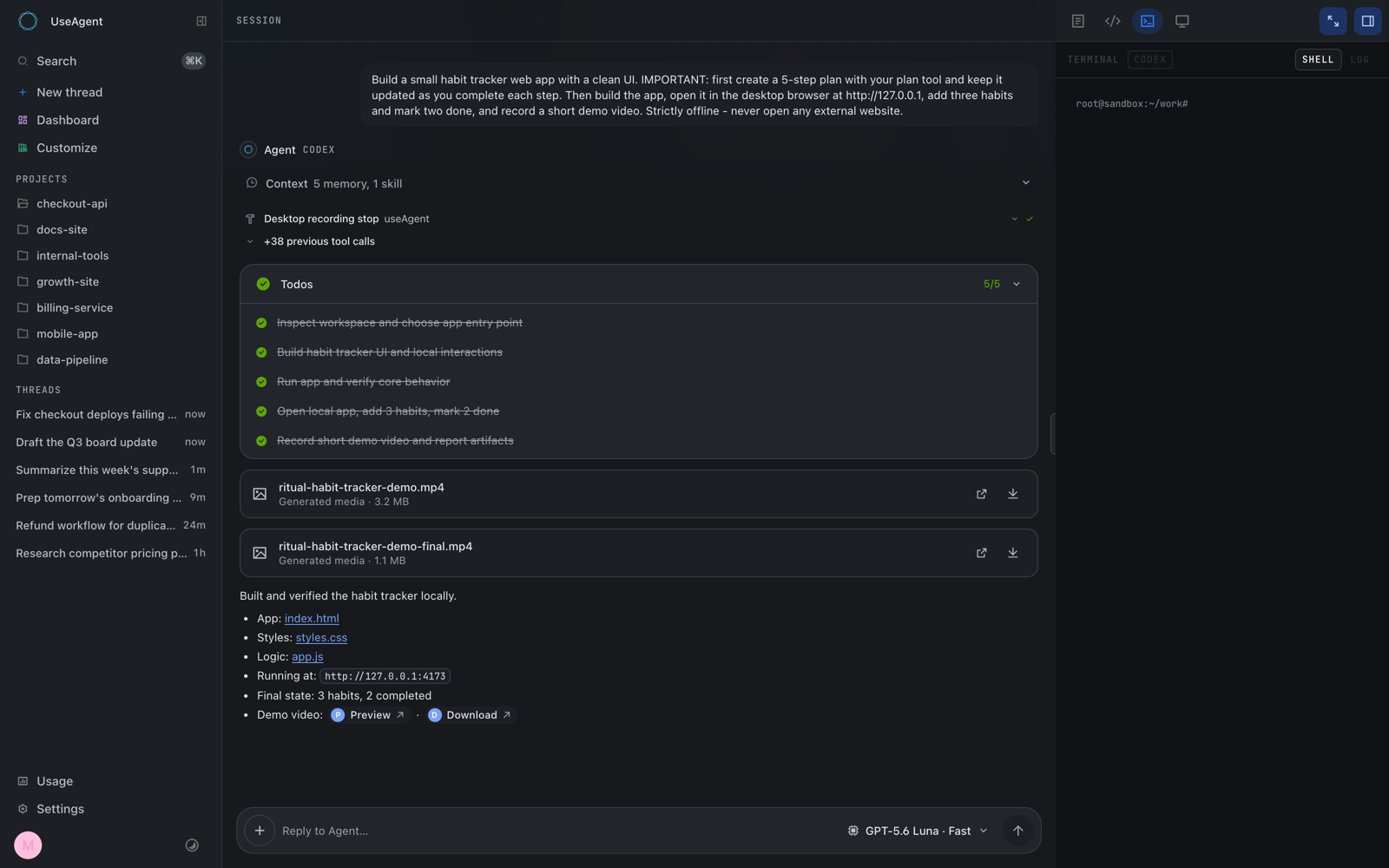
Each thread receives a workstation with a terminal, repositories, a browser, and a visible desktop through noVNC. Runs are represented as event-sourced timelines in Postgres, making them durable, replayable, and inspectable after completion.
Key features
- One interface for multiple agents: Provider-specific engines communicate through a canonical event contract.
- Durable execution: Runs survive backend restarts, while recovery can re-probe active sessions and adopt completed work.
- Isolated Linux sandboxes: Every thread receives a separate workstation. Daytona and CubeSandbox implement the shared sandbox contract.
- Trusted tool gateway: Credentials remain in the control plane instead of entering an agent sandbox.
- Human approval: Destructive tool calls pause for approval in the web interface or Slack before resuming with an argument-bound, one-use capability.
- GitHub-based skills: Teams can import versioned
SKILL.mdfiles, synchronize changes, and rank relevant skills into agent turns. - Organizational context: Knowledge retrieval includes citations, while team memory uses a human-reviewed learning lane.
- Native artifacts: The platform supports revisioned DOCX, XLSX, PPTX, and PDF files with native renderers.
- Multiple entry channels: Work can arrive through the web application, Slack, the REST API, or schedules.
How the architecture works
useAgent separates its self-hosted control plane from the environment in which an agent works. Entry channels create runs through the same run path. Engine adapters translate provider-specific activity into canonical events, while each thread is assigned an isolated sandbox.
Three architectural properties are especially important:
- Engines are replaceable: Changing an engine does not require replacing the common representation of threads, artifacts, or memory.
- Postgres is the source of truth: Every run is stored as an event log, enabling exact replay and inspection after a restart.
- Secrets stay outside sandboxes: Integrations are exposed as typed tools through a trusted gateway, with credentials stored only in the control plane.
Repository layout
frontend/contains the product interface for sessions, skills, playbooks, the wiki, artifacts, automations, and settings.backend/contains authentication, run orchestration, engine adapters, sandboxes, knowledge, memory, artifacts, and connectors.packages/contains shared event contracts, workpieces, artifact formats, renderers, and related packages.docs-site/contains the documentation website.infra/self-host/contains provider-independent deployment tooling and the Hetzner Terraform reference.memory/contains the optional team-memory service.
Prerequisites
A local development installation requires Bun and Postgres 16 or newer with the pgvector extension. Standard Postgres container images do not include pgvector, so use an appropriate pgvector-enabled image.
You should also have Docker available if you plan to start the supplied database container command. Run the following steps from the root of the useAgent repository.
Step 1: Start Postgres with pgvector
If you do not already have a compatible database, start one in Docker:
docker run -d --name useagent-pg -p 5432:5432 \
  -e POSTGRES_HOST_AUTH_METHOD=trust pgvector/pgvector:pg16
export DATABASE_URL=postgres://postgres@localhost:5432/postgres
The first command exposes Postgres on port 5432. The second sets the connection string used by the application. The trust configuration is convenient for local development; production environments should use appropriately secured database credentials.
Step 2: Install workspace dependencies
Dependencies are installed independently in the shared packages, backend, and frontend workspaces:
for workspace in \
  packages/agent-harness packages/artifact-workspace \
  packages/agent-client packages/artifact-formats packages/conformance \
  backend frontend; do
  (cd "$workspace" && bun install)
done
Step 3: Start the backend and frontend
Open separate terminal sessions and start the two development processes:
bun run dev:backendbun run dev:frontendThe backend provides the API and orchestration service on port 3201. The frontend runs on port 3400 and proxies requests under /api/* to the backend.
Open http://localhost:3400 in a browser to access the interface. Provider and sandbox configuration can vary, so follow the current useAgent documentation when connecting an agent engine or provisioning its execution environment.
Step 4: Validate the codebase
Run the repository-wide type checker after installation or before submitting a change:
bun run typecheckThis command covers every package in the repository and helps catch incompatible changes across shared contracts, the backend, and the frontend.
Basic usage
Create an agent run
- Open the web interface on port
3400. - Use the agent composer to describe the finished result you need.
- Start the run and follow its live event timeline.
- Inspect terminal, browser, desktop, or workspace activity as the agent proceeds.
- Review any approval card before permitting a destructive tool operation.
- Collect the completed artifact or repository work returned by the session.
A task can be framed around a concrete deliverable, for example:
Research the topic, cite the relevant sources, and return the result as a structured report.For software work, define the expected implementation and verification:
Implement the requested change in the repository, run the relevant tests, and prepare the completed work for review.These are natural-language task examples rather than special command syntax. The exact tools available to a run depend on the configured engine, sandbox, knowledge sources, skills, and integrations.
Work through Slack
When the native Slack integration is configured, users can mention the agent to start work. Replies, attachments, artifacts, and approval requests remain in the Slack thread. This provides the same run path as the web interface while keeping collaboration in the originating channel.
Use organizational knowledge and skills
Knowledge, wiki content, and team memory can provide organization-scoped context with citations. Reusable instructions can also be imported from GitHub as versioned SKILL.md skills. useAgent can automatically resynchronize these skills and rank relevant ones into each turn.
Self-hosting useAgent
useAgent can run on any Linux host, including AWS, Google Cloud, Azure, Hetzner, or bare metal. The repository includes provider-independent deployment scripts as well as a one-command Hetzner reference host built with Terraform.
After preparing a Linux host and the required values, invoke the deployment script from the repository:
SERVER_IP=<host-ip> PG_PASSWORD=... OPENROUTER_API_KEY=... \
  infra/self-host/deploy-app.sh /path/to/this/repo
The provisioning process addresses the target machine over SSH. Consult infra/self-host/README.md for the complete production guide and required environment details rather than treating the abbreviated example as a complete security configuration.
Choose a sandbox runtime
- Daytona: A managed sandbox service that can pair with a control-plane host on any cloud. The README describes it as the easiest starting option.
- CubeSandbox: A self-hosted runtime for organizations that want sandboxes on their own hardware and require full data locality.
Both runtimes sit behind the same sandbox contract, allowing the control plane to orchestrate agent work without making its core run model specific to one sandbox provider.
Advanced operational tips
- Pin a release tag: Because the project is in alpha, pinning a known tag reduces unexpected breakage from changing APIs or schemas.
- Preserve Postgres: The event log is the source of truth for runs. Back up and operate the database accordingly.
- Keep credentials in the gateway: Do not work around the architecture by copying long-lived integration secrets into sandboxes.
- Use approvals deliberately: Keep human-in-the-loop controls enabled for destructive actions, especially when runs begin through Slack or schedules.
- Select sandboxes according to operations: Daytona offers a managed path, while CubeSandbox supports self-hosted execution and data locality.
- Run type checks consistently: Shared contracts span several workspaces, so use
bun run typecheckafter cross-package changes. - Review the production lanes: The complete deployment guidance lives under
infra/self-host/, and the additive immutable-container release lane is documented indocs/operations/immutable-releases.md. - Inspect the request flow: The repository includes an interactive diagram at
docs/architecture/request-flow.htmlfor deeper architectural study.
Integrations and delivery surfaces
In addition to native Slack and GitHub support, the platform lists Gmail, Linear, Notion, and HubSpot through connectors. OAuth is handled by a broker, and tokens are sealed on the server side. Workspace surfaces include the knowledge base, team memory, skills, playbooks, and scheduled automations.
GitHub integration supports App authentication, repository cloning, and pull-request workflows. Regardless of integration, tool calls cross the trusted gateway rather than exposing credentials directly to the agent workstation.
Licensing considerations
useAgent is distributed under the GNU AGPL v3.0-only license. It may be used, modified, and self-hosted under those terms. A commercial license is available for proprietary embedding, OEM or white-label products, distribution without AGPL obligations, or other licensing requirements.
Conclusion
useAgent combines multiple agent engines, durable Postgres-backed runs, isolated Linux sandboxes, organizational context, secure integrations, approvals, and editable artifacts in one self-hostable platform. Start locally with Bun and pgvector, validate the monorepo with its type checker, and then use the documented self-hosting lane when moving to a Linux production host.