

What Is Yogurt?
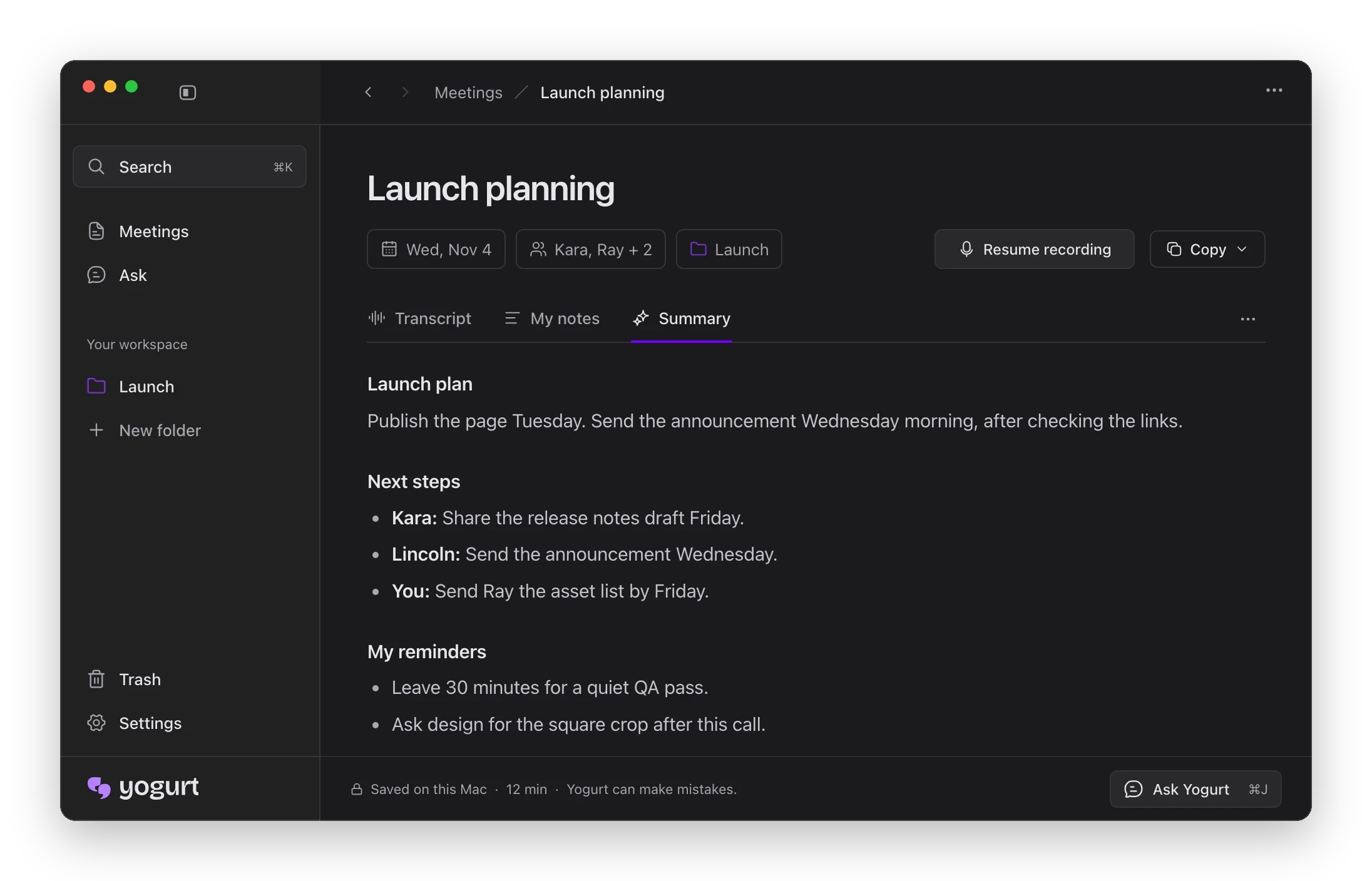
Yogurt is a free, open-source desktop application for creating private AI meeting notes. It records your calls without adding a bot or participant to the meeting, then presents useful meeting information such as a summary, the plan, next steps by person, and personal reminders.
Because Yogurt is a desktop app, you install it directly on your computer rather than adding an integration to your video-conferencing service.
Key Features
- Private meeting notes: Yogurt is designed for private AI-assisted note-taking.
- Bot-free recording: Calls are recorded without adding a bot to the meeting.
- AI-generated organization: Meeting output can include a summary, the plan, next steps grouped by person, and your own reminders.
- Open-source licensing: The project is available under the MIT license.
- Cross-platform downloads: Prebuilt releases are available for Apple Silicon Macs, Windows x64, and Linux x86_64 AppImage systems.
System Requirements
Before installing Yogurt, make sure your computer meets the requirements listed by the project:
- macOS: macOS 14.4 or later on Apple Silicon.
- Windows: Windows 10 version 2004 or later on x64.
- Linux: Ubuntu 22.04 or a similar x64 distribution using the AppImage release.
- Memory: At least 8 GB of memory.
Install Yogurt
macOS
- Open the latest Mac download.
- Download the DMG file.
- Open the downloaded file and follow the normal macOS installation process.
- Launch Yogurt when installation is complete.
Windows
- Download the latest Windows installer.
- Run the downloaded EXE file.
- Complete the installation prompts.
- Open Yogurt from the installed application.
Linux
- Download the latest Linux AppImage.
- Make the AppImage executable using your desktop environment or a terminal command such as
chmod +x Yogurt-linux-x86_64.AppImage. - Run the AppImage to start Yogurt.
Basic Usage
1. Open Yogurt Before Your Call
Launch the desktop application before the meeting you want to document. Since Yogurt records the call without adding a bot, your meeting does not need an extra participant or meeting-service bot.
2. Record the Call
Use Yogurt during your call to capture the meeting. The README describes Yogurt as an application that records calls without adding a bot; follow the controls displayed in the installed app to begin and manage the recording.
3. Review the Meeting Notes
After the call, review the generated meeting notes in Yogurt. The project screenshot shows a meeting summary with the plan, next steps organized by person, and reminders for you.
4. Use the Follow-Up Information
Use the structured output to revisit the meeting plan, identify who owns each next step, and check your personal reminders. This makes the notes useful for follow-up without requiring you to manually reorganize the entire conversation.
Advanced Tips
Choose the Correct Release
Download the build that matches both your operating system and processor architecture. Apple Silicon Mac users should use the ARM64 macOS release, Windows users should use the x64 installer, and Linux users should use the x86_64 AppImage on Ubuntu 22.04 or a similar distribution.
Keep the Environment Supported
Use a supported operating system and provide at least 8 GB of memory. Meeting these requirements helps ensure that your setup matches the project’s documented environment.
Read the Project Documentation
For troubleshooting and additional guidance, visit the project’s Help documentation. Developers who want to run the project locally can consult the build and run locally guide.
Inspect and Build the Open-Source Project
Yogurt is released under the MIT license, so technically minded users can review the source repository and explore the documented local build process. Use the repository’s own instructions for the required development setup rather than assuming that the packaged downloads and local builds use identical steps.
Conclusion
Yogurt provides a straightforward way to create private AI meeting notes from a desktop app. Install the release for your platform, start it before a call, record without adding a meeting bot, and review the resulting summary, action items, and reminders. If you need more help, use the project documentation or follow its local build guide.