

What Is Awesome Claude Opus 5.5 Videos?
Awesome Claude Opus 5.5 Videos is an independent, source-linked research collection about videos made with Claude Opus 5.5. Rather than treating every finished MP4 as a video generated directly by the model, the repository investigates what Claude reportedly did during production.
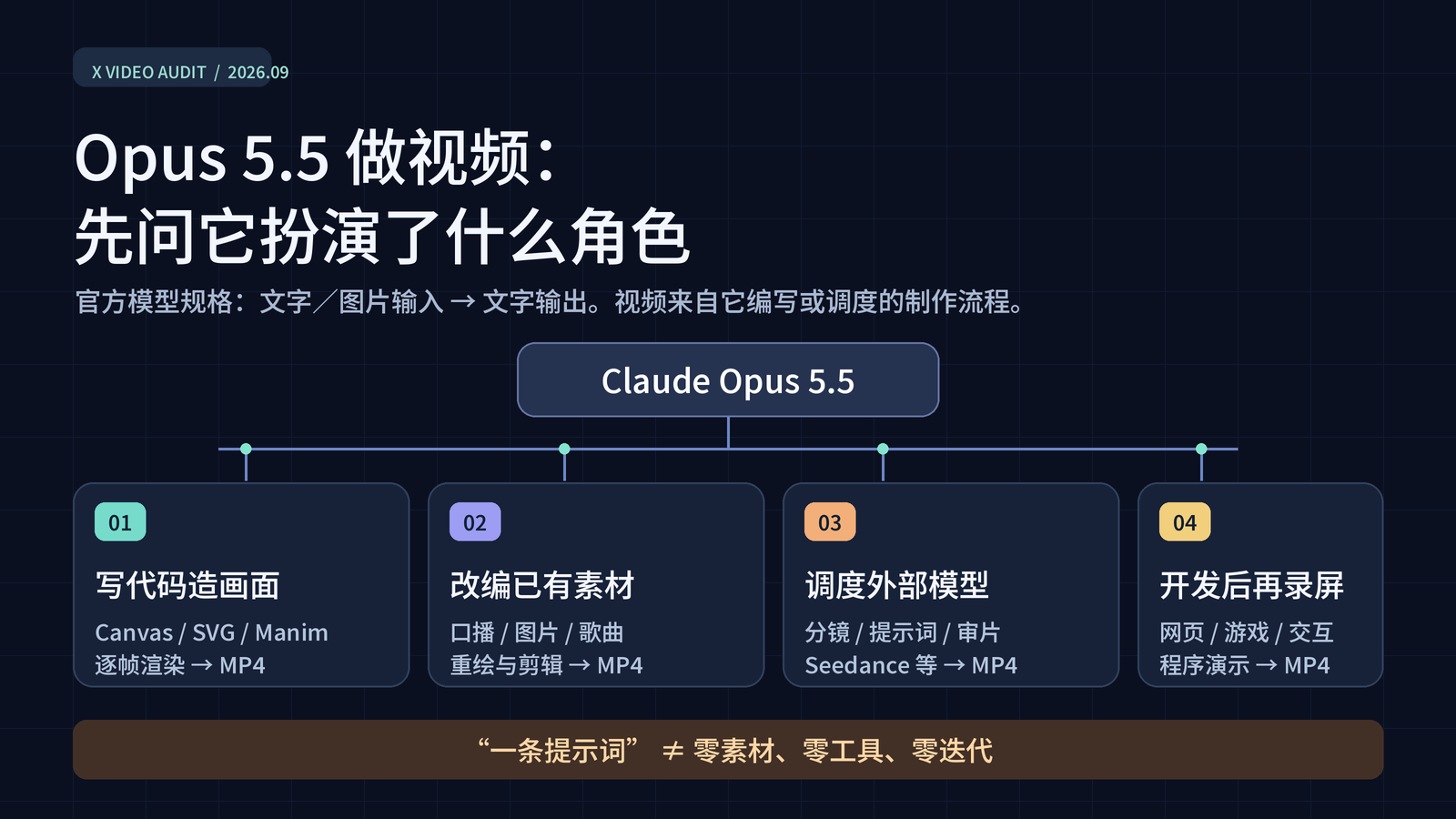
That distinction matters because Anthropic describes Opus 5.5 as accepting text and image input and producing text output. Video pixels can therefore come from rendering code written by Claude, software controlled by Claude, supplied footage edited through a Claude-assisted workflow, an external video model coordinated by Claude, or an application recorded by its creator.
The repository is not affiliated with Anthropic, X, Hypit, or the Awesome directory. It links back to original creator posts and separates public evidence from interpretation.
Key Features of the Collection
- Source-linked cases: Entries point to original X posts, public prompts, creator explanations, and source projects when available.
- Multiple production routes: Examples include code-drawn animation, educational explainers, real-time 3D graphics, footage transformation, external video-model pipelines, apps, and games.
- Evidence labels: Cases distinguish matched public code, published prompts, and creator-reported workflows.
- Structured datasets: The repository provides a 160-case audit index in
data/cases.csv, field documentation, a domain-and-style dataset, search coverage records, and a frozen corpus snapshot. - Methodological limits: The documentation explains what frame sampling, file hashing, search results, and public disclosures can and cannot prove.
- Reusable research material: Supporting documents include a prompt and workflow matrix, reusable prompt templates, a methodology report, and media-profile information.
Understanding the Dataset
The September 25, 2026 snapshot reports 1,242 unique candidate posts, 1,156 candidates with MP4 files, and 1,180 attachments. SHA-256 comparison found 1,138 byte-distinct files. A vision model classified nine sampled frames plus post text for those files, labeling 767 as “yes” and 126 as “likely” for Opus involvement.
The resulting 893 files are useful for studying subjects and visual styles, but the labels are classifier judgments rather than verified authorship. The repository also emphasizes that its 160 reviewed cases are not a prevalence survey.
Search results, reposts, engagement numbers, and visual similarity are not proof that a particular model created a video.
Major Content Domains
The classified collection covers games and interactive demos, AI-related content, advertisements and launches, explainers, short stories, music videos, art, history and culture, humor, and data visualization. Games and interactive demos form the largest listed category, followed by AI-related videos and advertisements or launches.
Visual Styles
Prominent styles include 3D, motion graphics and user interfaces, flat cartoons, pixel art, hand-drawn work, paper cut-outs, ink or paint effects, generative visuals, anime, mathematical diagrams, photoreal imagery, live action, and retro terminal graphics. Each classified file receives one primary domain and one primary style, with an optional secondary style.
How the Evidence Labels Work
Before using an example as proof of a workflow, check its evidence label.
- Code matched: A public project associated with the creator contains scenes, text, timing, or output corresponding to the sampled video. This is stronger evidence, but it still does not reveal the complete Claude conversation.
- Prompt shown: The creator published a prompt or detailed production brief. A prompt requesting a service does not prove that every requested call happened.
- Creator account: The workflow is described in a creator post or reply. Independent observation is limited to the accessible MP4 and its nine sampled frames.
Some entries combine public projects with creator accounts. Always read the wording attached to the individual case rather than treating all entries as equally verified.
Installation and Setup
This repository is a research collection, not an application or software library. It does not require a package manager, API key, or build process for ordinary use. You can read it directly on GitHub or download it for local analysis.
Option 1: Browse Online
- Open the repository README.
- Use its contents list to choose a production category.
- Open the linked creator post, prompt, or public source project.
- Consult
data/cases.csvwhen you need the complete reviewed case index. - Read the methodology and field guide before drawing quantitative conclusions.
Option 2: Clone the Repository
Copy the repository URL from GitHub’s Code menu, then run:
git clone REPOSITORY_URL
cd REPOSITORY_DIRECTORY
No additional dependency installation is documented in the README. After cloning, the main files can be inspected with a text editor, spreadsheet application, or standard command-line tools.
head -n 5 data/cases.csv
head -n 5 data/domain-style.csv
cat data/corpus-snapshot.json
The head and cat commands are common on macOS and Linux. On other platforms, open the same files in an editor or spreadsheet program.
Important Files
data/cases.csv: The index of 160 reviewed examples.data/domain-style.csv: Domain and visual-style classifications for files labeled “yes” or “likely.”data/corpus-snapshot.json: Frozen collection counts for the documented snapshot.docs/case-index-guide.zh-CN.md: Definitions for fields in the case index.docs/methodology.zh-CN.md: Details about collection and review methods.docs/search-coverage.zh-CN.md: Search scope, query coverage, and limitations.docs/prompt-matrix.zh-CN.md: A comparison of prompts and workflows.docs/prompt-playbook.zh-CN.md: Reusable prompt templates.
Several supporting documents are written in Chinese. The repository also provides a Chinese version of its main README.
Basic Usage: Research a Video Workflow
A productive way to use the project is to start with a production route rather than searching only for visually impressive results.
- Choose a category. Decide whether you want code-rendered animation, 3D graphics, footage editing, an external model pipeline, or a captured application.
- Select a case. Read the repository’s summary and note the evidence label.
- Open the original post. Examine exactly what the creator claims and whether a prompt, source repository, or making-of document is linked.
- Compare observable details. Check durations, scene content, captions, timing, or frame counts against the public project where possible.
- Record uncertainty. Separate independently observable details from self-reported costs, tool calls, production times, and asset counts.
Example 1: Study a Code-Drawn Animation
The ant colony animation is linked to a matching Node Canvas source project. The repository identifies corresponding animation elements, character rigging, frame checks, and an FFmpeg workflow, so the case receives the stronger Code matched label.
Use this case when researching how a language model can contribute rendering code and production tooling without directly emitting an MP4.
Example 2: Examine Real-Time 3D Graphics
The Clearwater example shows photographic-looking shallow water. Its public WebGL2 project documents waves, refraction, and caustics, while the X video is a capture of the real-time graphics output.
This demonstrates why a polished video should not automatically be categorized as generated footage. It can instead be a recording of code-driven graphics.
Example 3: Trace an External Model Pipeline
The infinite-zoom collage has a public brief that assigns scenery, cutouts, animated figures, and music to multiple external models while Opus coordinates shots and transitions.
For this type of case, distinguish orchestration from rendering. A workflow can meaningfully involve Claude even when another service produces some visual or audio assets.
Example 4: Analyze a Captured App or Game
The can-collection simulation includes a live browser demonstration and a making-of post. The materials document a program, human design approval, revisions, and frame export.
This is useful for studying videos whose main artifact is an interactive application. The video is evidence of the app in operation, not necessarily the primary output of the model.
Using the Collection to Plan Your Own Workflow
The repository can help you choose a production architecture without implying that every published claim is reproducible.
- For deterministic 2D animation: Review Canvas, SVG, JavaScript, p5.js, React, or Remotion examples.
- For educational content: Study cases combining diagram systems such as Manim or SVG with narration tools.
- For real-time visuals: Examine WebGL2, ray-marching, Blender, and browser-based projects.
- For editing supplied material: Review examples that retain human performances, existing audio, project files, or source takes.
- For model orchestration: Look at workflows that explicitly assign separate responsibilities to Claude and external image, video, voice, or music systems.
- For interactive work: Treat the recorded video as a demonstration of an app, simulation, visualizer, or game.
The examples also show that human intervention varies widely. Some creators supplied detailed specifications, scripts, songs, images, character assets, existing projects, or multiple rounds of feedback. Avoid describing these workflows as one-shot generation unless the evidence explicitly supports that claim.
Advanced Research Tips
Separate Claims from Observations
Create two notes for every case: one for facts observable in the public media or source project, and another for creator-reported information. Production duration, token use, API spending, model calls, hidden tool invocations, and rendering counts often belong in the second group unless logs or billing records are available.
Check for Reposts and Duplicate Files
The project uses SHA-256 hashes to identify byte-identical files. This matters because a later repost can attach a specific model name to a video even when the earlier post used less precise wording. The README describes one highly engaged Western-civilization video that was excluded from the reviewed Opus index because the original model version remained unclear.
Do Not Treat Engagement as Attribution
Likes and reposts measure audience activity, not production provenance. A viral post is not automatically better documented than a low-engagement case with public code and a reproducible workflow.
Use Classifications as Navigation Aids
The domain and style labels help locate relevant examples, but they are not ground truth. One primary label can miss mixed styles, and a nine-frame sample cannot fully represent motion, editing, narrative structure, or audio.
Validate Quality Separately
The collection does not certify subject accuracy, pronunciation, audio quality, animation quality, or the highest-resolution master. For example, an educational video may have an identifiable production workflow while still requiring independent review of its formulas, narration, and teaching quality.
Preserve the Snapshot Date
When citing statistics, include the September 25, 2026 snapshot date. Search limits, unavailable posts, rate limiting, unrelated results, and later changes mean the reported counts should not be presented as a complete census of all Opus-assisted videos or all content on X.
What the Repository Does Not Distribute
The project does not distribute the original X MP4 files, raw search results, private paths, or individual contact sheets. Instead, the public dataset links to creators and records distinctions between creator disclosures and observations made through sampled media.
The repository’s original annotations, writing, and diagrams are licensed under CC BY 4.0. Linked posts, videos, music, prompts, and external projects remain the property of their respective rightsholders. Review THIRD_PARTY.md before reusing third-party material.
Contributing Corrections or New Cases
Consult CONTRIBUTING.md before proposing a case. Appropriate contributions include a new original post, a better source link, or a correction to a workflow classification. Strong submissions should identify the original creator, link to public evidence, describe the production route carefully, and avoid turning unsupported claims into facts.
Conclusion
Awesome Claude Opus 5.5 Videos is most valuable as a guide to production methods and evidence, not simply as a gallery. By following source links, checking evidence labels, consulting the structured datasets, and preserving uncertainty, you can study how Claude participates in video workflows without confusing code generation, tool coordination, media editing, external model output, and screen capture.