

- Monthly visits
- 0
- Pricing
- Free & Paid
- Listed
- 2025-11-23
- Updated
- 2026-08-25
01Product Positioning
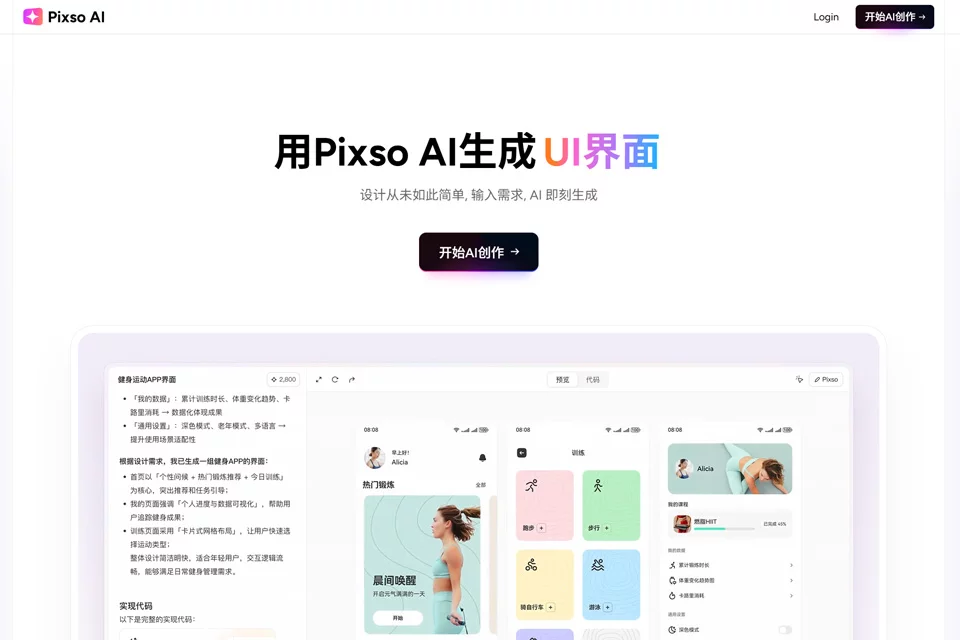
Pixso AI is positioned as an AI design assistant within the Pixso editor, connecting creative ideation, interface design, and developer handoff. Users describe page or visual requirements in text, generate content, and return to the canvas for further editing.
It is best used as an auxiliary tool within the design process to quickly develop concepts and organize deliverables, rather than as a replacement for complete requirements analysis, interaction refinement, and design decisions.
02Key Features
The tool supports text-to-UI generation, creating editable interfaces with layers, components, and auto layout based on descriptions. It also supports text-to-image and image-to-image generation for creating or adjusting visual assets.
For design organization and delivery, Pixso AI can generate design specification documents containing information about colors, typography, and core components. It can also identify design elements and output frontend code such as Vue and React. Additional features include multilingual translation, interface copy optimization, and conversational layout and color adjustments.
03Use Cases
Designers can use it to quickly explore initial concepts for login pages, e-commerce homepages, websites, or application interfaces, then continue modifying them on the canvas. Product managers can generate interface drafts from text to support discussions and product concept validation.
Creative teams can use text-to-image and image-to-image generation for style exploration and asset creation. Startups and full-stack developers can use design specifications and frontend code output to reduce repetitive work in design organization and developer handoff.
04Usage Considerations
Generation quality depends on the text description, reference assets, and specific requirements. Generated interfaces, images, copy, and code all require manual review, especially to verify information accuracy, layout details, component states, and whether the code meets the project's technical requirements.
Although content can be further edited on the Pixso canvas, complex pages may still require additional interaction design, responsive adaptation, and engineering work. The product offers both free and paid plans; current limits and availability should be confirmed on the product page.
© Disclaimer: domains and linked content may change over time. AIEZZ does not control third-party websites. Review external content and risks independently.
User reviews0